
Premium Report - Sales Velocity
Sales Velocity - Days of Inventory Available
Sales Velocity reports are used to see how quickly something has been selling so you can plan your inventory accordingly.
As a Premium Report, this is available on all Paid Plans of Report Toaster. If you aren't signed up, follow these steps here to upgrade your account.
(click image to enlarge)
A few terms to be familiar with in order to understand Sales Velocity Reports.
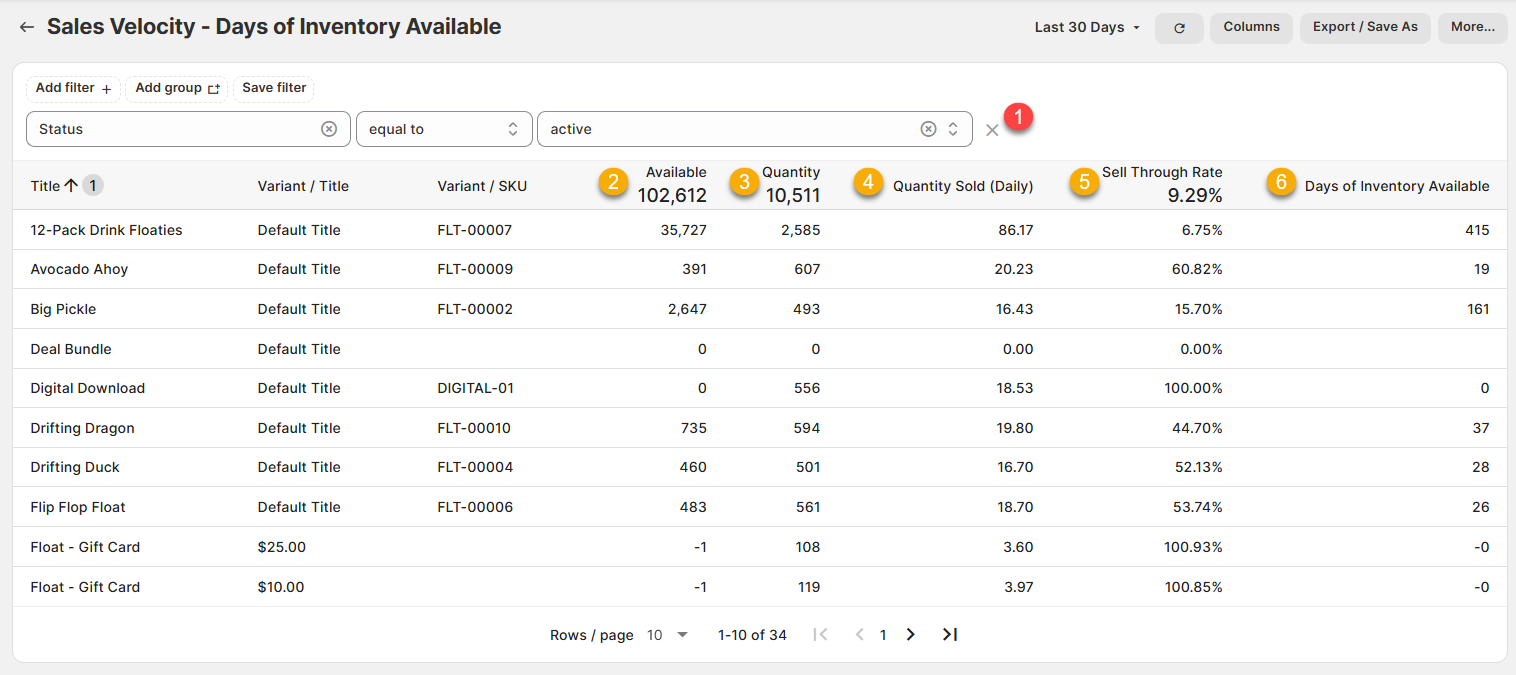
1.) Status, equal to, Active (FILTER): This filter ensures that only currently active products display in the report.
This prevents lots of draft products with 0 sales and 0 available from showing in the report.
2.) Inventory available: The quantity of units you currently have in stock for a particular product/variant/vendor.
For example, I have 391 units of the Avocado Ahoy product currently in stock in my warehouse.
3.) Quantity: The units sold for a particular product/variant/vendor. This number does NOT factor in Returns (for that, replace the column with Net Quantity instead).
For example, I sold 607 units of the Avocado Ahoy product.
4.) Quantity Sold (Daily): The average number of units sold for a particular variant each day.
This number is worked out based on the Quantity (above) divided by the number of Days in the Date Range (top right)
For example, if I sold 607 units of the Avocado Ahoy product in a 30-day period, then the calculation would be 607/30 = 20.23
5.) Sell Through Rate: The Sell Through Rate (STR) for a particular product/variant/vendor.
This is worked out as a percentage by taking the Quantity Sold divided by (Inventory available + Quantity Sold) x100
For example, if I sold 607 units of the Avocado Ahoy product and still have 391 units in stock, then the calculation would be 607 / (391+607) x 100 = 60.82%
6.) Days of Inventory Available: This compares the Quantity Sold (Daily) with the Inventory available to determine how many days of stock you have left.
For example, if my Quantity Sold (Daily) of the Avocado Ahoy was 20.23 and I had Inventory available of 391 in Stock, then the calculation would be 391/20.23 = 19.
Like all Report Toaster reports, these reports are fully customizable - so you can adjust the date range, add/remove columns, introduce a filter or change the sort to suit your individual needs. See our basic guides here for more info.
For other premium reports you can add to your account, check out our other article guides here.